
Exxon Mobil Rewards+™ app FAQs
Find answers to the most common questions about using the Exxon Mobil Rewards+ app — from setup and security to earning and redeeming points.
 Chat with us
Trending topics
The Exxon Mobil Rewards+ app allows you to easily earn, track and redeem points for savings and provides multiple secure ways to pay at the pump and inside the store at participating Exxon™ and Mobil™ locations. Explore the app´s benefits, features and navigation. Watch the video for a sneak peek of the app.
Access your account via the Exxon Mobil Rewards+ website, then go to “Points Circle” to invite other card members. Alternatively, you can call us at our Customer Service line at 1-888-REWARD+ (1-888-739-2730
) for further assistance.
Make sure the latest version of the app is installed on your device. If you are still experiencing an error after uninstalling and reinstalling the app, the station could be experiencing a configuration issue between your device and the Wi-Fi connection. You can call us at our Customer Service line at 1-888-REWARD+ (1-888-739-2730) for assistance.
Not all Exxon and Mobil stations participate in the Rewards program, so points cannot be earned at non-participating stations. If you have any questions, please call us at our Customer Service line at 1-888-REWARD+ (1-888-739-2730).
The Exxon Mobil Rewards+ app accepts all major credit cards, Exxon Mobil Personal Cards, Exxon Mobil Smart Card+™, Exxon Mobil Direct Debit+™ (ACH debit payment), the Exxon Mobil FleetPro™ credit card and tech wallets, including Apple Pay, Samsung Pay, Google Pay and Mastercard Click to Pay. At this time, the app does not support other ExxonMobil fleet cards or gift cards. Please be advised that currently, the Exxon Mobil Rewards+ app does not support Apple Pay tech wallet for mobile pay inside the store.
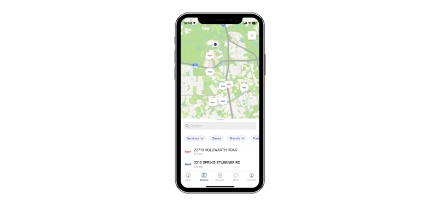
The Station Survey may appear on the home screen after a transaction. This is an opportunity for you to provide feedback about your station experience. Your feedback is greatly appreciated.
All information is stored in a secure environment.
The Exxon Mobil Rewards+ app is available in the App Store for iOS 15 and above and on Google Play for phones running Android OS 6 and above. It´s free to download.
We're always working on enhanced features, bug fixes and performance improvements. Make sure you stay up-to-date with the latest Android and iOS version for the best experience.
The Exxon Mobil Rewards+ app allows you to easily earn, track and redeem points for savings and provides multiple secure ways to pay at the pump and inside the store at participating Exxon and Mobil locations. Explore the app´s benefits, features, and navigation. Watch the video for a sneak peek of the app.
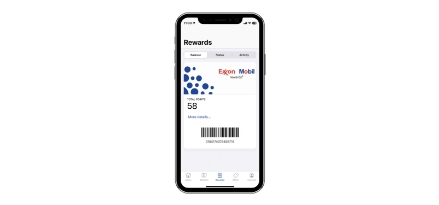
The Exxon Mobil Rewards+ app accepts all major credit cards, Exxon Mobil Personal Cards, Exxon Mobil Smart Card+™, Exxon Mobil Direct Debit+™ (ACH debit payment), the Exxon Mobil FleetPro™ credit card and tech wallets, including Apple Pay, Samsung Pay, Google Pay and Mastercard Click to Pay. At this time, the app does not support other ExxonMobil fleet cards or gift cards. Please be advised that currently, the Exxon Mobil Rewards+ app does not support Apple Pay tech wallet for mobile pay inside the store.
The Station Survey may appear on the home screen after a transaction. This is an opportunity for you to provide feedback about your station experience. Your feedback is greatly appreciated.
All information is stored in a secure environment.
Launch the Exxon Mobil Rewards+ app. Select "Account" from the lower right menu, then scroll to "Wallet" where you can add or edit a credit or debit card.
The Exxon Mobil Rewards+ app currently limits users to two credit/debit cards in the wallet, plus the tech wallet and your Exxon Mobil Direct Debit+™ account.
Fuel pumps require you to provide a payment method (credit card or debit card) before activating the pump. However, you will not be charged when buying fuel if your points cover the cost of your purchase. When using your credit or debit card, you may see a preauthorization hold based on your card’s bank or payment provider that will be removed based on their standard process.
If you have a digital wallet set up on your compatible devices, simply download the Exxon Mobil Rewards+ app and create an account. Your digital wallet information is automatically added to your account as a payment method. If you set up your digital wallet after downloading the Exxon Mobil Rewards+ app, you can add the digital wallet information like you would any other payment method (by going to your "Account" > "Wallet" > "Add a payment method").
At this time, the Exxon Mobil Rewards+ app supports Visa, American Express, Mastercard, Discover, ExxonMobil BusinessPro, ExxonMobil Smart Card+™ credit card and Exxon Mobil Direct Debit+ account when using a digital wallet as your payment method.
Your bank/device support centers (Apple, Samsung, Mastercard) are ready to help you with any issue you may encounter when adding credit or debit cards to your device. Please contact your applicable support center for assistance.
Yes, Google Wallet is allowed. Please be advised that currently, the Exxon Mobil Rewards+ app does not support Apple Pay tech wallet for mobile pay inside the store.
About ExxonMobil´s branded payment programs
Can I earn Exxon Mobil Rewards+ points when using my Exxon Mobil Smart Card+ credit card in the app?
Yes, if you are a member of Exxon Mobil Rewards+ and your purchase is made with the Exxon Mobil Smart Card+ credit card, you will receive the instant savings at the pump, and you will earn points to use for a future purchase.
Yes. In addition to applying at Smart Card+ page, you can also apply in the app. Open the Exxon Mobil Rewards+ app and click on the “Featured” tile at the bottom of the home page. You’ll then be prompted to start filling out the application.
Please contact Exxon Mobil Smart Card+ Customer Service at at 1-800-344-4355 (TTY: Use 711 or other Relay Service) with 24/7 automated customer service and live customer support: Monday to Friday from 7 a.m. to 9 p.m. CT, Saturday from 9 a.m. to 7:30 p.m. CT and Sunday from 11 a.m. to 7:30 p.m. CT. Online support is also available through the Smart Card+ account portal.
To enroll for an Exxon Mobil Direct Debit+ account, you must download the Exxon Mobil Rewards+ app and have a checking account.
- Launch the Exxon Mobil Rewards+ app.
- Select "Account."
- Select "Wallet,", then click on "Add Payment" located at the upper right side of the screen.
- Select "Direct Debit+" to begin the enrollment process. Enter your personal information and your banking credentials.
- After your Direct Debit+ account is linked to the selected checking account, a digital account will be automatically added to the mobile app so you can start paying with Exxon Mobil Direct Debit+ in the app immediately.
Yes, you can use your Exxon Mobil Direct Debit+ account to pay for fuel at the pump and eligible in-store items through the Exxon Mobil Rewards+ app.
Yes, if you are a member of Exxon Mobil Rewards+ and your purchase is made with your Exxon Mobil Direct Debit+ account, you will receive the instant savings at the pump, and you will earn points to use for a future purchase.
Yes, you can redeem your eligible points balance while using your Exxon Mobil Direct Debit+ account as a payment method. At participating Exxon™ and Mobil™ stations, you can select the amount of available points to redeem before authorizing the pump in the Exxon Mobil app if you have at least 100 points for use in your Exxon Mobil Rewards+ account.
Please contact the Exxon Mobil Direct Debit+ support team at 1-844-422-4460: Monday to Friday from 7 a.m. to 9 p.m. EST.
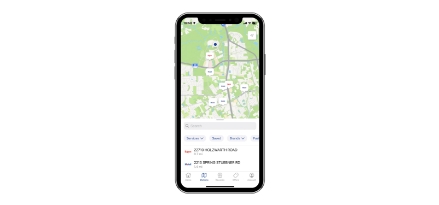
To pay for fuel through the Exxon Mobil Rewards+ app, please follow these instructions:
- At the fuel pump, launch the Exxon Mobil Rewards+ app on your phone.
- Click the "Pay at Pump" button from the home screen.
- Enter the pump number, select your payment method and click on the "Activate Pump" button.
- You can also select how many points you’d like to redeem for dollars off in the mobile app before authorizing the pump to begin fueling.
- Once your payment method is authorized and you have authorized the pump in the app, you can select your grade of fuel at the pump as you normally would, then lift the nozzle to begin fueling.
- Don’t forget to sign up for e-receipts. You can do so when finished.
To pay for fuel through the Exxon Mobil Rewards+ app, please follow these instructions:
- At the fuel pump, launch the Exxon Mobil Rewards+ app on your phone.
- Click the "Pay at Pump" button from the home screen.
- Enter the pump number, select your payment method and click on the "Activate Pump" button.
- You can also select how many points you’d like to redeem for dollars off in the mobile app before authorizing the pump to begin fueling.
- After selecting “Authorize Pump,” if your digital wallet is set as your default payment, you'll use Touch ID or Face ID to authorize payment. You do not have to tap your phone to the pump to make a purchase. If your digital wallet is not the default payment method, you can click on the existing payment method after authorizing the pump to open up the option to select your digital wallet of choice.
- Once your payment method is authorized and you have authorized the pump in the app, you can select your grade of fuel at the pump as you normally would, then lift the nozzle to begin fueling.
- Don’t forget to sign up for e-receipts. You can do so when finished. To sign up for e-receipts open the app, click on “Account,” then “Settings,” then “Notifications.” Then shift the email receipt toggle button to the on (blue) position.
When you are directed to "Scan QR code," your phone's camera will open automatically in the Exxon Mobil Rewards+ app. Hold your phone two inches away from the pump and center the QR code (it looks like a pixilated square) on your screen. The app will scan the code once it’s in view and automatically select your pump number.
Once you have authorized the pump in the app, you can select your grade of fuel at the pump as you normally would, and then lift the nozzle to begin fueling.
Yes, you can use the app to securely pay and earn rewards with mobile pay inside the store on eligible in-store purchases at participating Exxon and Mobil stations. Please note that the purchase of lotto/lottery tickets, money orders, gift cards and mobile phones is not permitted for indoor mobile transactions made via the Exxon Mobil Rewards+ app at participating Exxon and Mobil sites. Consistent with all applicable laws, cash will be required for these purchases.
Yes. Please be advised that the purchase of lotto/lottery tickets, money orders, gift cards and mobile phones is not permitted for indoor mobile transactions made via the Exxon Mobil Rewards+ app at participating Exxon and Mobil sites. Consistent with all applicable laws, cash will be required for these purchases.
No. Please be advised that the purchase of lotto/lottery tickets, money orders, gift cards and mobile phones is not permitted for indoor mobile transactions made via the Exxon Mobil Rewards+ app at participating Exxon and Mobil sites. Consistent with all applicable laws, cash will be required for these purchases.
To pay inside with your mobile app, please follow these instructions.
- At checkout, open the Exxon Mobil Rewards+ app.
- Click on the "Pay in Store" button from the home screen.
- Select your payment method and click on the “Generate QR code” button for touchless checkout. Please note that the QR code may expire if not used immediately. If it expires, please generate a new one.
- You can also select how many points you’d like to redeem for dollars off in the mobile app before you generate the QR code.
- After generating the QR code in the app, display it to the cashier for scanning. When finished, you will get an e-receipt on the app.
No. We do not support split payments for indoor mobile transactions using the Exxon Mobil Rewards+ app.
While the in-app payment QR code is presented to the cashier to scan and process an indoor mobile payment for a specified in-store transaction, the loyalty barcode only contains information related to your rewards account and is often scanned to still accrue or redeem rewards points during a transaction when a physical loyalty card is forgotten.
You will be able to see the offers on items in the convenience store for the Exxon™ or Mobil™ station you are fueling at based on your location under “My Offers.” Your location services must be enabled for these to appear.
Not all Exxon and Mobil stations participate in the Rewards program, so points cannot be earned at non-participating stations. If you have any questions, please call our Customer Service line at 1-888-739-2730.
At the station, launch the Exxon Mobil Rewards+ app and select “Pay at Pump" or "Pay in Store" to begin your fuel or in-store transaction. You will automatically earn Exxon Mobil Rewards+ points on fuel, qualifying convenience store items and car wash purchases made with the Exxon Mobil Rewards+ app. After completing a transaction, your Exxon Mobil Rewards+ points balance will be updated to reflect your most recent transaction.
After creating an Exxon Mobil Rewards+ app account, you will be able to earn Exxon Mobil Rewards+ points on your fuel, convenience store items and car wash purchases at participating locations.
At participating Exxon™ and Mobil™ stations, you can select the amount of available points to redeem before activating the pump in the Exxon Mobil Rewards+ app if you have at least 100 points for use in your Exxon Mobil Rewards+ account. If you are using your mobile device to pay inside, you can select the amount of available points to redeem before you generate the QR code for indoor payment at checkout. Please be advised that Exxon Mobil Rewards+ points cannot be used when using NFC Apple Pay on fuel purchases. Please note that currently, the Exxon Mobil Rewards+ app does not support Apple Pay tech wallet for mobile pay inside the store.
Your Exxon Mobil Rewards+ points balance will be updated in the Exxon Mobil Rewards+ app up to 48 hours after a transaction.
No, the Exxon Mobil Rewards+ app does not use your phone number to sign in or redeem points. To sign in to the app, use your email address and password.
You can use the referral code when you are registering at the Exxon Mobil Rewards+ website or through the Exxon Mobil Rewards+ app.
When you register for an Exxon Mobil Rewards+ account online or in the app, enter the referral code during registration. Your bonus points rewards will depend on the Terms & Conditions for that specific referral code promotion. You do not need a referral code for registration.
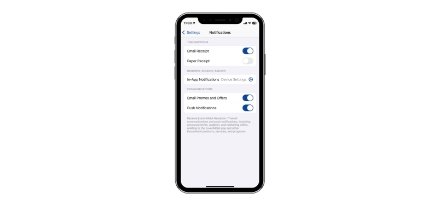
You can add a passcode to the Exxon Mobil Rewards+ app as an extra layer of security. If your phone is lost or stolen, we strongly encourage to follow these steps to secure your app account. Change your password: As soon as possible, change the password associated with your Exxon Mobil Rewards+ app account to prevent unauthorized access. Access your account from the Exxon Mobil Rewards+ website, then select “Edit password” in the password section to update it. Contact Customer Service: Reach out to our Customer Service line at 1-888-REWARD+ (1-888-739-2730) to report the loss or theft of your phone. They can help secure your account and provide guidance.
Please call our Customer Service line at 1-888-REWARD+ (1-888-739-2730) for further assistance.
Make sure the latest version of the app is installed on your device. If you are still experiencing an error after uninstalling and reinstalling the app, the station could be experiencing a configuration issue between your device and the Wi-Fi connection. You can call our Customer Service line at 1-888-REWARD+ (1-888-739-2730) for assistance.
Make sure location services are enabled on your phone and the Exxon Mobil Rewards+ app has permission to access your location. Please also ensure that the latest version of the app is installed on your device. Begin by restarting the app and attempting the payment again. If the issue persists, the station could also be experiencing a configuration issue. We kindly request that you use an alternative form of payment to complete your fuel or in-store purchase. Make sure to enter your phone number (Alt-ID) or swipe your physical Exxon Mobil Rewards+ card to earn Exxon Mobil Rewards+ points on your transaction. Please consider contacting our Customer Service line at 1-888-REWARD+ (1-888-739-2730) to report the issue. By doing so, we can work together to resolve the issue promptly.
Please be aware that not all Exxon and Mobil stations participate in the rewards program, so points cannot be earned at non-participating stations. Please consider contacting our Customer Service line at 1-888-REWARD+ (1-888-739-2730). Your feedback is vital in helping us enhance your experience.
Please be aware that not all Exxon and Mobil stations participate in the rewards program, so points cannot be earned at non-participating stations. If you have any questions, please call our Customer Service line at 1-888-REWARD+ (1-888-739-2730).
Please ensure you have location services turned on for the Exxon Mobil Rewards+ app. If your location-based services are turned on, the app will be able to identify which station you are at. If your location-based services are turned off, or there is interference, you will be directed to scan the QR code located on the pump. Look for the QR code on the top right corner of the pump!
Please try another pump. If the issue persists, the station could be experiencing a configuration issue. We kindly request that you use an alternative form of payment to complete your fuel purchase. Make sure to enter your phone number (Alt-ID) or swipe your physical Exxon Mobil Rewards+ card to earn Exxon Mobil Rewards+ points on your transaction. Please consider contacting our Customer Service line at 1-888-REWARD+ (1-888-739-2730) to report the issue. By doing so, we can work together to resolve the issue promptly.
Prior to generating the in-app payment QR code, ensure that all items rung up by the cashier at checkout for the specified purchase are eligible. Combining eligible and non-eligible in-store items in a single indoor mobile payment transaction through the Exxon Mobil Rewards+ app will result in a declined transaction. Non-eligible in-store items include: lotto/lottery tickets, money orders, gift cards and mobile phones. Consistent with all applicable laws, cash will be required for purchase of these items. If issues persist with only eligible items, please utilize an alternative payment method. Please consider contacting our Customer Service line at 1-888-REWARD+ (1-888-739-2730) to report the issue. By doing so, we can work together to resolve the issue promptly.
No. It is not possible.
All sites need to be equipped with specific technology to process mobile payments inside the store. While we are diligently working to onboard all sites for this new feature, it might take some time to ensure seamless implementation across our network. If you encounter any issues or have questions, please call our Customer Service line at 1-888-REWARD+ (1-888-739-2730) for further assistance. Your feedback and inquiries are valuable in assisting us to address this matter effectively. We appreciate your understanding and patience as we work towards providing you with the best fuel experience possible.
Sign in to your account on the Exxon Mobil Rewards+ website, then go to “Points Circle” to invite other card members. Alternatively, you can call us our Customer Service line at 1-888-REWARD+ (1-888-739-2730) for further assistance.
Please call us our Customer Service line at 1-888-REWARD+ (1-888-739-2730) for further assistance.
This means your account has been temporarily blocked for your protection. At this time, you will not be able to use points for savings. Please call us our Customer Service line at 1-888-REWARD+ (1-888-739-2730) for further assistance.
Earn automatically with the Exxon Mobil Rewards+™ app


You accepted the Terms & Conditions and Privacy Policies when you fully enrolled in the program by completing your profile at registration.